5 Customer Onboarding Steps to Automate First: Managers’ Roadmap
Customer onboarding automation replaces manual account setup, verification, and welcome tasks with rule-based or AI-driven workflows, and its main payoff is faster time-to-value with fewer manual touches per account. Customer success, RevOps, product, and compliance teams all benefit from it once volume gets high enough. The first move for any team: map your primary onboarding path before you automate a single step.
TL;DR:
- Automation is most effective when onboarding volume is high, most steps are repeatable, and regulatory compliance requires consistent, auditable processes.
- Prioritize automating account creation, sign-on, and document verification first, then expand to provisioning, billing, and customer guidance once initial steps are stable.
- Integrate core systems through APIs, webhooks, and middleware, ensuring data security and clear audit trails, with a focus on matching customer status across platforms.
- Measure key metrics such as time-to-value, activation rate, and drop-off points to validate automation success and identify where manual effort still persists.
- Start small by automating the highest-volume, lowest-risk steps, using phased rollout and validation before adding complex personalization, AI, or compliance features.
Table of Contents
- What Is Customer Onboarding Automation and Why Does It Matter?
- Which Onboarding Processes Should You Automate First?
- What Technology and Integrations Does Onboarding Automation Need?
- How Do You Design an Automated Onboarding Workflow?
- Which Metrics Actually Prove Onboarding Automation Works?
- How Should You Roll Out Onboarding Automation?
- What Does a Real Onboarding Automation Project Look Like?
- How Do You Personalize Automated Onboarding Without Losing Consistency?
- What Security and Compliance Steps Does Onboarding Automation Require?
- What Do Successful Onboarding Automation Projects Have in Common?
- How Do You Choose Between Onboarding Automation Tools?
- How Do You Keep Communication Personal When It’s Automated?
- What Leaders Get Wrong About Onboarding Automation
- How Nullbit Helps You Build Onboarding Automation That Actually Ships
- Sources
- FAQ
What Is Customer Onboarding Automation and Why Does It Matter?
Customer onboarding automation is the use of triggers, integrations, and workflow logic to move a new customer from signup to active use without a human repeating the same steps for every account. It replaces the spreadsheet, the manual welcome email, and the ad hoc Slack ping to provisioning with a system that fires the same sequence every time, correctly.
The business case rests on three outcomes. Activation rates climb because customers hit their first meaningful action faster, without waiting on a rep’s calendar. Retention improves because a consistent onboarding experience catches confused or stalled customers before they churn quietly in week two. Cost-to-serve drops because your team stops spending hours on tasks a workflow engine handles in seconds.
Automation pays off fastest under three conditions:
- High volume: Hundreds or thousands of new accounts a month make manual onboarding a bottleneck, not a nice touch.
- Repeatability: If most accounts follow the same 80% of steps, that 80% is a strong automation candidate.
- Compliance pressure: Regulated processes benefit from consistent, auditable execution that a human workflow can’t guarantee at scale.
If your onboarding volume is low and every account is genuinely unique, automation delivers less. Most B2B companies past a few dozen new accounts a month find the math works in their favor almost immediately, echoing what SHRM’s analysis of repeatable administrative tasks found in HR and benefits contexts: automation saves real money specifically where the work repeats.
Which Onboarding Processes Should You Automate First?
Not every step deserves the same priority. Some tasks are pure friction with no judgment required, which makes them ideal first targets. Others touch risk, compliance, or relationship building, and need more care.
- Account creation and single sign on. Automating signup and SSO provisioning removes the single biggest early drop-off point, since customers who hit a manual approval delay at step one often never come back to finish.
- Document capture and verification for regulated flows. For KYC, AML, or licensing checks, automation should capture documents, run screening, and log every decision, since manual review at this stage is slow and inconsistent.
- Welcome sequences and in-app guidance. Triggered emails, checklists, and contextual tooltips guide a new user toward their first success moment without a CSM having to hand hold every account.
- Provisioning and billing integration. Once a customer signs, their environment, license tier, and billing record should sync automatically, closing the gap between “signed” and “actually able to use the product.”
- Scheduling, handoffs, and stalled-customer nudges. Automated scheduling links and nudge sequences catch the customer who stalls at step three of setup, before they go quiet.
Userpilot’s guide to onboarding automation lists a similar checklist of processes worth automating, from signup through in-app guidance, and treats provisioning as the natural next link once account creation is handled.
Pro Tip: Automate the step with the highest drop-off rate first, not the step that annoys your team the most. Drop-off data tells you where customers actually quit; internal annoyance tells you where your team is bored.
What Technology and Integrations Does Onboarding Automation Need?
Reliable automation depends on a handful of systems talking to each other cleanly, not on one monolithic tool doing everything.
The core systems worth connecting:
- CRM: the system of record for the customer relationship and where onboarding status should always be visible to sales and CS.
- Product or app environment: where provisioning, license assignment, and feature flags actually take effect.
- Billing platform: syncing subscription status so a paid account is never stuck behind a manual invoice step.
- Identity and KYC providers: for verification-heavy industries, this is where document checks and screening happen.
- E-signature tools: for contracts, terms acceptance, and any legally binding step in the flow.
Integration between these systems typically happens through REST APIs for direct calls, webhooks for event-based triggers, SDKs for embedding functionality directly into your product, and middleware or workflow engines like Zapier for connecting tools that don’t talk to each other natively. Mailchimp’s overview of automated onboarding integrations points to Stripe and Zapier as common connectors precisely because they sit in the middle, moving data between billing and communication tools without custom code.
Two things matter more than any single tool choice: data mapping and audit trails. Decide early which system is the single source of truth for customer status, because conflicting records across CRM and billing create the support tickets that erode trust. Every automated step touching personal or financial data needs encryption in transit and at rest, plus access controls that log who changed what, and when. For a deeper look at sequencing this kind of integration work, Nullbit’s guide to implementing AI automation walks through the same dependency planning at enterprise scale.
How Do You Design an Automated Onboarding Workflow?
Start by mapping every step a customer actually takes today, not the steps your process documentation claims they take. Watch a handful of real onboarding sessions if you can. The gap between the documented flow and the real one is usually where automation projects go wrong.
Once you have the real map, identify branch points: the moments where a self-serve customer diverges from an enterprise customer, or where a failed verification check needs a different path than a passed one. A workflow that only handles the happy path will fail loudly the first time a document upload bounces.
Decide which steps fire on events and which run on schedules:
- Event-based triggers fire the moment something happens: a signup completes, a document uploads, a payment clears.
- Scheduled checks run on a timer: a daily sweep for accounts stuck at the same step for 48 hours, a weekly digest of incomplete onboarding.
Set service-level targets for each stage, and build retry and escalation logic into the workflow itself rather than relying on someone noticing a stalled account. If a verification check fails twice, escalate to a human reviewer automatically instead of leaving the customer in limbo. Build clear handoff packages for CSMs too: when a workflow reaches a point requiring human judgment, the CSM should receive full context, not a bare notification that says “customer needs help.”
Teams that build these flows using structured tutorials tend to move faster than teams improvising from scratch. Zapier’s own walkthrough for building an automated client onboarding system is built around exactly this trigger and branch logic, and gives teams a template rather than a blank canvas.
Which Metrics Actually Prove Onboarding Automation Works?
Three numbers matter more than the rest: time-to-value, activation rate, and onboarding completion rate. Time-to-value measures how long it takes a new customer to reach their first meaningful outcome. Activation rate tracks what percentage of new signups actually reach that outcome at all. Completion rate shows how many customers finish the full onboarding sequence versus abandoning partway through.
Behind those, track the operational signals that reveal where your automation is leaking effort:
- Manual touch time per account: how many minutes of human work still happen per onboarding, and where.
- Exception rate: what percentage of accounts fall out of the automated path and need manual intervention.
- Stage-by-stage drop-off: which specific step loses the most customers.
Instrument these as funnels and cohorts, not just aggregate averages. A cohort view lets you compare customers onboarded in March against customers onboarded in June after a workflow change, which is the only honest way to know if a change actually helped. Run changes as experiments where you can: a redesigned welcome sequence tested against the old one on a split of new signups tells you far more than a before-and-after comparison contaminated by seasonality.
Report these numbers on a cadence that matches how fast your onboarding volume moves. Weekly dashboards work for high-volume, self-serve products. Monthly reviews suit lower-volume, higher-touch enterprise onboarding where a single account can skew a week’s numbers.
How Should You Roll Out Onboarding Automation?
Rushing a full automated ecosystem into production is the most common way these projects stall. A phased approach protects your team from breaking the one thing customers rely on most: getting started without friction.
- Phase 0, map and measure. Document the current process exactly as it happens, capture baseline time-to-value and completion numbers, and pick the single path with the highest volume and lowest complexity as your starting point.
- Phase 1, automate the low-risk, high-volume tasks. Signup, welcome messaging, and basic provisioning are safe first targets because a mistake here is easy to catch and fix.
- Phase 2, integrate verification and provisioning. Once the low-risk automations are stable, connect identity checks, billing sync, and full environment provisioning, since these touch more systems and carry more failure modes.
- Phase 3, add personalization and agentic AI where it earns its place. Dynamic content, conversational qualification, and AI-driven routing belong here, after the foundational flow is proven, not before.
The most common mistake is skipping Phase 0 entirely and jumping straight to buying a tool. Without a baseline, you can’t prove the automation worked, and you can’t tell if a launch problem is the workflow or the underlying process it automated. A close second: automating a broken process and simply making the breakage faster.
Pro Tip: Run Phase 1 for at least one full onboarding cycle before touching Phase 2. You need real data on what breaks before adding more moving parts to the system. This phased sequencing mirrors guidance in Nullbit’s process automation guide for mid-sized enterprises, which treats measurement before automation as the difference between a project that sticks and one that gets quietly abandoned.
What Does a Real Onboarding Automation Project Look Like?
A technology partner built a concierge chat for a travel client designed to qualify leads in real time instead of routing every inbound conversation to a human first. The sequence connected the chat interface to the CRM, applied qualification rules as the conversation happened, and only handed off to a human agent once a lead met defined criteria.
Testing focused heavily on the handoff moment itself. A qualification workflow that quietly misroutes a good lead is worse than no automation at all, so the team validated each rule against real conversation transcripts before expanding scope.
The real gain wasn’t just speed. It was that CSMs stopped starting cold. Every handoff arrived with context already attached, which meant the human conversation could start at the point that actually needed a human.
The measured result was faster lead qualification and a meaningful drop in manual triage time per lead, freeing the sales team to spend their hours on conversations that already cleared the qualification bar. Full details are in the concierge chat case study.
How Do You Personalize Automated Onboarding Without Losing Consistency?
Personalization in an automated flow doesn’t mean writing a different sequence for every customer. It means branching a consistent framework based on data you already have: company size, plan tier, stated use case, or behavior in the first session.
Segment before you personalize. A self-serve customer on a starter plan needs a fast, mostly automated path with in-app guidance. An enterprise account needs the same automated backbone, provisioning, billing sync, welcome sequence, but with human checkpoints inserted at moments that matter, like a kickoff call or a technical onboarding review.
Use behavioral triggers, not just static segments. If a customer hasn’t completed a key setup step within 24 hours, the nudge they receive should reference that specific step, not a generic “come back and finish setting up” message. Generic nudges get ignored; specific ones get acted on because they tell the customer exactly what’s left.
Keep the tone consistent even as content varies. A workflow that personalizes data but shifts voice awkwardly between automated and human touchpoints creates a jarring experience. If your welcome email sounds warm and your in-app tooltip sounds like a system error message, the inconsistency undermines the automation’s credibility.
Finally, resist over-personalizing early. A new automation program with three segments and clear branch logic beats one with twenty micro-segments nobody can maintain. Add complexity only once you have data proving a segment actually behaves differently enough to justify a separate path.
What Security and Compliance Steps Does Onboarding Automation Require?
Every automated workflow that touches personal, financial, or identity data inherits real compliance obligations, and skipping this planning is the fastest way to turn a productivity project into a liability.
Encrypt data in transit and at rest across every system in the flow, including the middleware or workflow engine connecting your CRM to your billing platform. Access controls matter as much as encryption. Not every team member needs visibility into every field a KYC provider returns, and role-based access limits exposure if credentials are ever compromised.
Build audit trails into the workflow itself rather than bolting logging on afterward. Regulated onboarding platforms increasingly unify identity verification, screening, and approval into a single configurable workflow specifically because a unified, logged sequence of checks is far easier to defend in an audit than a patchwork of manual steps documented after the fact. That same logging approach gives compliance teams a real-time view of where an account sits in the verification process, instead of a retroactive reconstruction after something goes wrong.
Re-screening deserves particular attention for any onboarding flow with an ongoing compliance obligation. A customer who passed verification at signup can trigger a new risk flag months later, and an automated workflow that periodically re-runs checks catches this without requiring anyone to remember to look. Vendors serving regulated industries treat this auditable, repeatable screening as a core value proposition, not an add-on feature, because regulators increasingly expect it as standard practice.
What Do Successful Onboarding Automation Projects Have in Common?
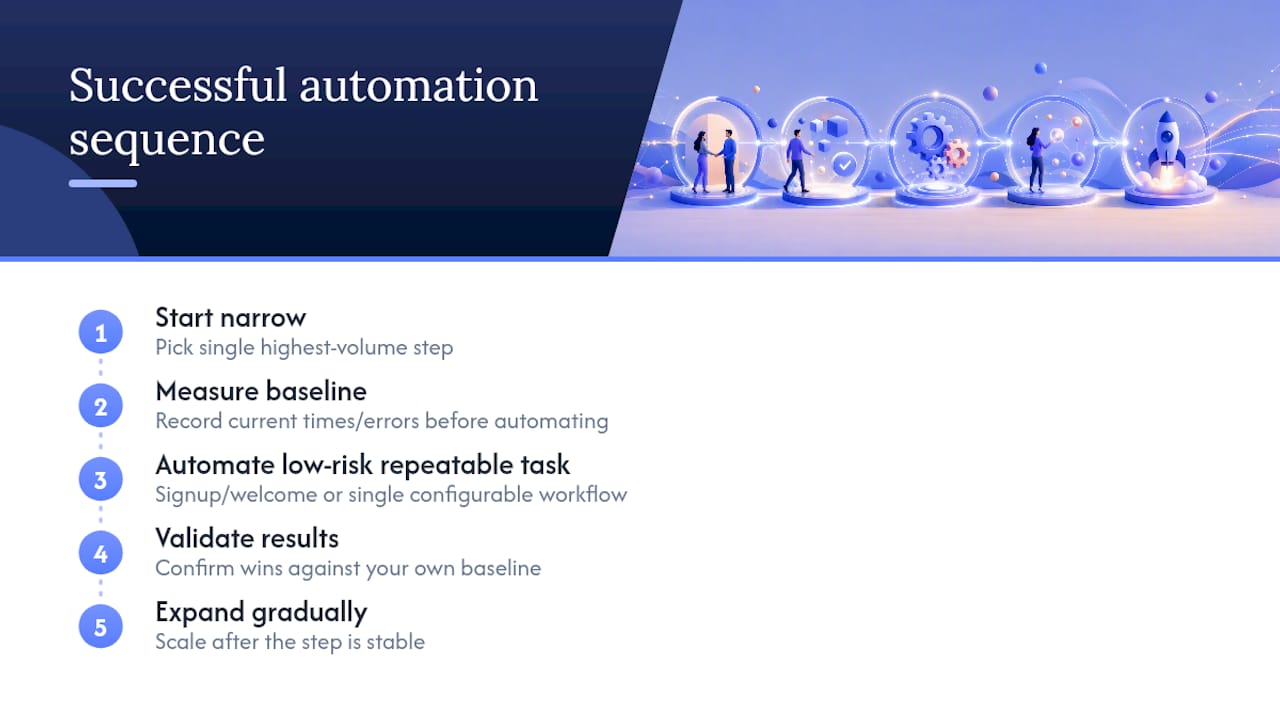
The strongest onboarding automation projects share one trait: they started narrow. Rather than automating an entire customer journey at once, successful teams picked the single highest-volume step, proved it worked, and expanded from there.
A software company automating signup and welcome messaging first, before touching provisioning, sees the pattern Userpilot describes: prioritizing high-volume, repeatable tasks yields the fastest measurable wins and cuts the friction that otherwise stalls account activation. That order matters because signup and welcome messaging are low-risk to automate wrong, unlike provisioning, where a mistake can leave a paying customer locked out of the product they just bought.
Regulated industries show a different but related pattern. Companies handling KYC and AML checks that move from manual, spreadsheet-tracked verification to a single configurable workflow report faster approval times and fewer compliance gaps, largely because the workflow captures, screens, and logs each check the same way every time instead of depending on an analyst remembering every step.
Vendor case studies sometimes cite dramatic speed gains, tripled onboarding throughput or sharply reduced manual data entry, but treat these figures as vendor-reported until you’ve validated them against your own baseline. Every organization’s starting point for manual effort differs enough that a headline number from one company’s case study rarely transfers directly to another’s.
The common thread across genuinely successful projects isn’t the specific tool chosen. It’s the discipline of measuring before automating, automating the highest-leverage step first, and expanding only once that step is stable.
How Do You Choose Between Onboarding Automation Tools?
The tool landscape splits roughly into three tiers, and the right one depends on your volume and complexity, not on which tool has the longest feature list.
Entry-level workflow platforms connect existing tools through prebuilt triggers and actions, no custom code required. These suit teams automating signup, welcome sequences, and basic provisioning across a handful of connected systems. They’re fast to set up and cheap to start, but they can hit real limits once your logic needs complex branching or your data volume grows past what a no-code platform handles gracefully.
Purpose-built onboarding software focuses specifically on customer or user onboarding, often bundling in-app guidance, checklists, and analytics alongside the automation itself. These fit product teams whose main goal is activation and feature adoption inside their own application, rather than backend process automation across many disconnected systems.
Custom-built automation makes sense once your onboarding involves regulated verification, complex multi-system provisioning, or branching logic specific enough that a generic platform can’t model it cleanly. This is also where a technology partner earns its keep: building the exact integration sequence your CRM, billing platform, and identity provider need, rather than forcing your process to fit a template.
For managers evaluating priorities before choosing any tool, a step-by-step automation checklist built for growing teams is a useful gut check on scope before you commit budget to any single platform.
Most companies end up using a mix: a no-code platform for the simple connective tissue, and custom development where compliance or complexity demands it.
How Do You Keep Communication Personal When It’s Automated?
The biggest risk in automated onboarding isn’t technical failure. It’s a customer feeling like they’re talking to a machine when they expected a relationship.
Write every automated message as if a real person is sending it, because that’s what the customer assumes until proven otherwise. Avoid corporate boilerplate language in welcome emails and in-app prompts; specific, plain language (“You’re one step from connecting your first data source”) beats generic encouragement (“You’re almost there!”) every time.
Give customers a clear, visible path to a human whenever they need one. An automated flow that traps a confused customer in a bot loop with no escape does more damage than a slower, fully manual process would. A simple “talk to a person” link at any friction point costs little and prevents the worst outcomes.
Time your messages around behavior, not a fixed calendar. A message sent because “it’s day three” ignores whether the customer finished setup on day one or hasn’t logged in since signup. Trigger communication based on what the customer actually did or didn’t do, and the message will feel timely instead of automated.
Finally, close the loop. When automation resolves something, a failed payment retried successfully, a document re-verified, tell the customer plainly. Silence after an automated fix reads as nothing happened, even when it did.
What Leaders Get Wrong About Onboarding Automation
The biggest mistake isn’t under-automating. It’s treating automation as a replacement for judgment rather than a way to protect it for the moments that actually need a human. The workflows that hold up over time augment a CSM’s attention instead of erasing it.
Start with the highest-volume, lowest-risk task you have, and measure it obsessively before adding a second one. When the integration work outpaces your team’s bandwidth, especially connecting identity, billing, and CRM systems that were never designed to talk to each other, that’s the moment to bring in a partner who has built that exact sequence before.
— Matija
How Nullbit Helps You Build Onboarding Automation That Actually Ships
Reading a roadmap is one thing. Wiring your CRM, billing platform, and identity provider into a workflow that survives contact with real customers is another. Nullbit builds that connective layer for companies that need the integration expertise in-house teams often don’t have time to develop from scratch.
Nullbit’s AI automation services cover exactly the sequencing this article walks through: designing triggers and branches, connecting the systems in your stack, and building the exception handling that keeps a workflow from silently failing on the edge cases. For teams still validating an idea before committing to a full build, proof-of-concept development starting from €5,000 gives you a scoped way to test an automation concept against real data before expanding it. If your onboarding automation needs custom software beyond off-the-shelf connectors, smaller solutions start from €15,000 as a one-off build. Get in touch to scope which starting point, a proof of concept or a full agile engagement, fits your current onboarding bottleneck.
Sources
Zapier’s tutorial covers hands-on workflow building. Userpilot details prioritized processes to automate. Mailchimp explains integration patterns. SHRM documents automation’s cost impact on repeatable tasks.
- Customer Onboarding Automation: How-to Guide - Userpilot
- The Power of Automated Customer Onboarding - Mailchimp
- Automation can help reduce cost of benefits administration - SHRM
FAQ
How Do I Automate My Client Onboarding Process?
Start by mapping your current onboarding steps exactly as they happen, then automate the highest-volume, lowest-risk step first, typically signup or welcome messaging. Connect your CRM, billing, and identity systems through APIs or webhooks, and expand to verification and provisioning once the first automation is stable, following the phased approach Zapier’s tutorial walks through in detail.
What Is Onboarding Automation?
Onboarding automation uses triggers, integrations, and workflow logic to move a new customer from signup to active use without a person manually repeating each step. It typically covers account creation, verification, welcome sequences, and provisioning, connected through a CRM, billing platform, and identity tools.
What Is Customer Automation?
Customer automation is the broader category covering any customer-facing process, onboarding, support, billing, retention, handled through automated workflows instead of manual effort. Onboarding automation is one specific application, focused narrowly on the signup-to-activation journey.
What Is Remote Customer Onboarding?
Remote customer onboarding is the process of activating a new customer entirely online, without an in-person meeting or physical document exchange. It relies heavily on automation, digital identity verification, e-signature, and self-serve provisioning, to replicate what an in-person handoff used to accomplish.
How Much Does Onboarding Automation Cost to Build?
Costs vary by scope: a scoped proof of concept to validate an automation idea starts from €5,000, while a full custom software build for onboarding automation starts from €15,000 as a one-off project through Nullbit. Ongoing agile engagement work is priced between €5,000 and 40000 EUR per month depending on team size and scope, detailed on Nullbit’s cooperation page.


