

Budget $10,000 to $500,000: Mobile App Cost for Procurement Teams
A simple mobile app runs $10,000 to $50,000, a mid-scope app with real backend logic lands between $60,000 and $150,000, and a complex or marketplace platform can push past $250,000. The single biggest swing factor isn’t screens or design polish. It’s backend architecture, third-party integrations, and whether you build native for two platforms or one shared codebase.
TL;DR:
- Building a mid-scope app with features like user roles and payment integration typically costs between $60,000 and $140,000, with monthly costs around $1,500 to $5,000.
- The largest cost drivers are backend architecture and third-party integrations, not design polish or screens.
- Platform choice impacts costs significantly, with cross-platform frameworks offering 20% to 40% savings over native development.
- Early scope decisions made within the first two weeks are crucial to stay on budget, especially in public or compliance-heavy projects.
- Ongoing maintenance usually requires 15% to 25% of the initial build cost annually, plus additional expenses during OS upgrades or rapid user growth.
Table of Contents
- What Drives Mobile App Cost by Complexity Tier
- How Should You Split a Mobile App Budget by Phase?
- Native, Cross-Platform, or Web: Which Costs Less?
- What Do Developers, Designers, and PMs Actually Charge?
- How Long Does It Take to Build an App at Each Budget Level?
- What Does It Cost to Keep an App Running After Launch?
- How Can You Cut Mobile App Costs Without Cutting Quality?
- What Do Real Mobile App Projects Actually Cost?
- How Much Should You Budget for Marketing and User Acquisition?
- What Legal and Compliance Costs Should You Budget For?
- How Much Do App Updates and Version Upgrades Cost?
- An Editorial Take: What Procurement Teams Get Wrong About App Costs
- How Nullbit Turns This Budget Guide Into a Working App
- Where These Cost Figures Come From
- Sources
- FAQ
What Drives Mobile App Cost by Complexity Tier
Ask ten agencies “what does an app cost” and you’ll get ten different numbers, because the answer depends almost entirely on what the app actually does once you open it. The industry has settled into rough tiers, and knowing which one your project falls into is the fastest way to stop guessing.
Simple apps are single-purpose tools: a booking calendar, a loyalty card, a basic content viewer with five to eight screens and no custom backend logic beyond a login and a database read/write. A freelancer or small studio typically prices these between $10,000 and $35,000. An established agency, with project management, QA cycles, and a design system baked in, usually quotes $25,000 to $50,000 for the same scope. Ongoing monthly costs (hosting, app store fees amortized, minor bug fixes) generally sit under $500 a month.
Mid-scope apps introduce real product complexity: user accounts with roles, push notifications, payment processing, an admin dashboard, and integrations with two or three external services (a CRM, a payment gateway, an analytics stack). This is where most funded startups and mid-market businesses actually land. Freelance and boutique-team pricing typically runs $25,000 to $70,000, while agency pricing for the same feature set commonly falls in the $60,000 to $140,000 range, according to project cost benchmarks compiled across hundreds of scoped mobile projects. Monthly ownership costs (hosting, monitoring, third-party API fees, and a maintenance retainer) usually range from $1,500 to $5,000.
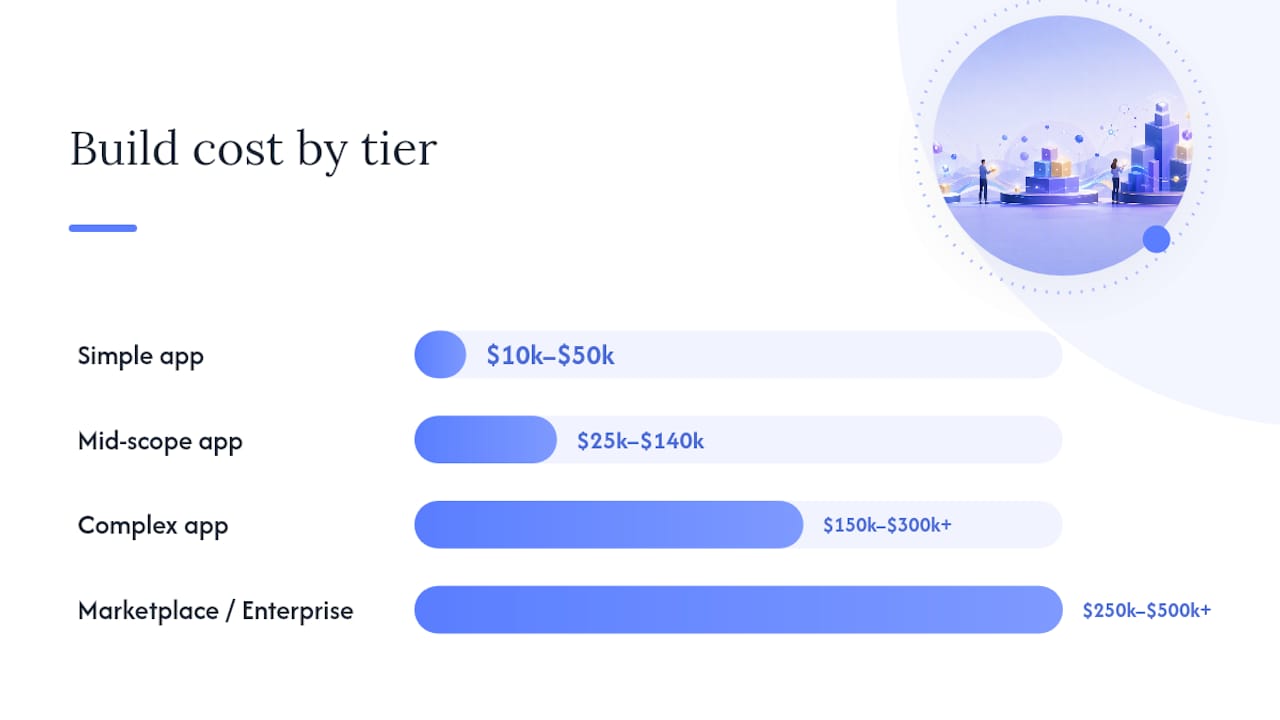
Complex and marketplace apps are a different animal entirely. Think two-sided marketplaces with real-time matching, apps with live video or AR features, fintech products with compliance requirements, or anything requiring custom machine learning pipelines. These frequently exceed $150,000 and can climb past $500,000 for enterprise-grade builds, a range confirmed across multiple industry surveys of app development spending. Monthly costs scale with usage but commonly start at $5,000 and climb well beyond that as user volume grows.
Here’s how the tiers break down at a glance:
- Simple app (5–8 screens, basic backend): $10,000–$50,000 build, under $500/month ongoing
- Mid-scope app (accounts, payments, integrations): $25,000–$140,000 build, $1,500–$5,000/month ongoing
- Complex app (real-time features, custom logic): $150,000–$300,000+ build, $5,000+/month ongoing
- Marketplace/enterprise platform (multi-sided, compliance-heavy): $250,000–$500,000+ build, scales with user base
One pattern worth noting: the gap between freelancer and agency pricing narrows as complexity increases. On a simple app, an agency might charge double what a freelancer charges for nearly identical output. On a complex app, that gap shrinks, because the coordination overhead, code review discipline, and QA rigor an agency brings actually start paying for themselves in fewer post-launch defects.
How Should You Split a Mobile App Budget by Phase?
Every mobile app budget breaks into the same five phases, and the percentage split holds remarkably steady across project sizes. Knowing these percentages lets you sanity-check any quote you receive and build a defensible line-item budget for internal approval.
-
Planning and discovery (5–10% of budget): requirements gathering, technical architecture decisions, competitive research, and a scoped feature list. On a $60,000 mid-scope project, that’s roughly $3,000 to $6,000 upfront, and skipping it is the single most common cause of scope creep later.
-
Design (10–20% of budget): wireframes, UI design, a design system, and usability testing. That same $60,000 project allocates $6,000 to $12,000 here, based on phase-level budget guidance widely used across the industry.
-
Front-end development (25–35% of budget): building the actual app screens, navigation, animations, and client-side logic. Expect $15,000 to $21,000 of that $60,000 budget to go here.
-
Back-end development (25–35% of budget): servers, databases, APIs, authentication, and third-party integrations. This phase carries roughly the same weight as front-end, another $15,000 to $21,000, and it’s the phase most likely to run over budget when integrations turn out messier than expected.
-
QA, testing, and launch (10–15% of budget): device testing, bug fixes, app store submission, and review-cycle management. Budget $6,000 to $9,000 here, and don’t shortchange it.
Add those up on a complex $200,000 build and the front-end and back-end phases alone can consume $100,000 to $140,000 combined, which is why backend architecture decisions (covered next) matter more than almost any other single choice you’ll make.
The phase that catches teams off guard isn’t development. It’s launch. App store submission isn’t a one-click event: Apple’s App Store review can take anywhere from a day to over a week, and rejections for missing privacy disclosures, broken flows, or metadata issues are common enough that experienced teams budget for multiple review cycles rather than assuming approval on the first try. Add compliance readiness (privacy policy, data handling disclosures, accessibility checks) and a “quick launch” can add one to three weeks and a few thousand dollars in unplanned rework that never made it into the original quote.
Native, Cross-Platform, or Web: Which Costs Less?
Platform choice is the lever with the biggest immediate effect on your quote, often more than the app’s actual feature list. Building fully native for both iOS and Android means writing two separate codebases in Swift and Kotlin, essentially building the app twice. Cross-platform frameworks like React Native and Flutter let you write one codebase that deploys to both, and that difference commonly saves 20% to 40% of total development cost on typical business apps.
That savings isn’t free. Cross-platform apps sometimes trade a small amount of performance and access to bleeding-edge OS features for the speed and cost advantage. For most business apps, booking tools, e-commerce, internal operations software, service marketplaces, that tradeoff is a non-issue. For apps that need heavy graphics rendering, augmented reality, or day-one access to a brand-new OS feature, native still wins.
Backend architecture is the second major lever, and it’s less talked about than platform choice despite often mattering more. A custom backend built from scratch, your own servers, your own API layer, your own authentication system, gives you full control but eats 30% to 50% of the total budget. Backend-as-a-Service platforms like Firebase or Supabase provide pre-built services such as authentication, a database, file storage, and push notifications that you configure rather than build from scratch, which can reduce backend costs significantly and shorten timelines.
- Native dual-stack (iOS + Android separately): highest cost, best performance, best access to platform-specific features
- Cross-platform (React Native, Flutter): 20–40% savings versus native dual-stack, strong fit for most business logic apps
- Progressive web app: lowest cost, no app store distribution, weakest fit for apps needing camera, GPS, or push notifications at native quality
- Custom backend: highest control and cost, justified when you have unusual data models or strict compliance requirements
- BaaS backend (Firebase, Supabase): faster and cheaper for standard CRUD apps, less control over infrastructure specifics
Pro Tip: Prototype your riskiest feature on a BaaS backend first, even if you plan to migrate to a custom backend later. You’ll validate the idea for a fraction of the cost, and you’ll know exactly which parts of the data model actually need custom engineering before you commit to it.
The cases where paying the native premium makes sense are narrower than most founders assume: apps built around camera or sensor-heavy AR, apps competing on raw animation performance (gaming, high-end media), or apps that need same-day access to new OS capabilities Apple or Google haven’t yet exposed to cross-platform frameworks.
What Do Developers, Designers, and PMs Actually Charge?
Hourly rates vary more by region than by individual skill level, which is exactly why so many companies now build with blended, distributed teams rather than a single local shop.
- United States: developers $100–$200/hour, designers $80–$150/hour, QA $60–$120/hour, project managers $90–$160/hour
- Western Europe: developers $70–$150/hour, designers $60–$120/hour, QA $50–$90/hour, project managers $70–$130/hour
- Eastern Europe: developers $35–$80/hour, designers $30–$65/hour, QA $25–$50/hour, project managers $40–$75/hour
- India: developers $20–$50/hour, designers $15–$40/hour, QA $15–$30/hour, project managers $25–$50/hour
The rate table only tells half the story. A freelancer at $40/hour sounds like a bargain until you factor in the risk: one person handling design, development, and QA is a single point of failure. If they get sick, take another contract, or simply misjudge a technical problem, your entire timeline stalls with no backup plan. Boutique agencies mitigate that risk with two or three people cross-trained on the project, at a moderate premium. Large agencies add heavier process, more predictable delivery, and higher overhead, often 1.5 to 2 times a boutique shop’s rate for comparable output.
In-house teams make sense once you’re past your third or fourth app and building software is core to your ongoing operations, not a one-time project. Below that threshold, the fixed cost of salaries, benefits, and management overhead rarely pencils out against a project-based engagement.
Blended teams, a senior architect in the US or Western Europe setting technical direction, paired with development execution in Eastern Europe or India, have become the default for a reason: they keep senior judgment on the parts of the project where mistakes are expensive, while routing routine implementation to markets where hourly rates are lower. Done well, this structure gives you cost predictability without collapsing quality on the decisions that actually matter.
How Long Does It Take to Build an App at Each Budget Level?
Timeline and cost move together, but not in a straight line. A simple app typically takes 8 to 14 weeks from kickoff to app store approval. A mid-scope app with payments and integrations usually runs 4 to 7 months. Complex apps and marketplaces commonly take 7 to 12 months for a full-featured first release, sometimes longer when regulatory review is involved.
Three risks blow up timelines and budgets more often than anything else:
- Late scope changes: adding “just one more feature” mid-build often costs three to five times what it would have cost if scoped from the start, because it forces rework on already-built dependencies.
- Third-party integration delays: payment processors, identity verification services, and legacy system APIs frequently have approval processes, sandbox limitations, or documentation gaps that add two to six weeks nobody budgeted for.
- Regulatory and compliance work: healthcare, fintech, and any app handling children’s data face review cycles and documentation requirements that can add a month or more to an otherwise straightforward build.
The fix isn’t more upfront planning meetings. It’s structural: lock your feature scope before development starts, and if new ideas surface mid-project, put them in a phase two backlog instead of the current sprint. Phased releases, launching with a tight core feature set and adding capability in planned increments, consistently outperform “build everything, launch once” approaches on both cost and time to market.
What Does It Cost to Keep an App Running After Launch?
Launching the app is the beginning of the spending, not the end of it. Hosting and third-party SaaS costs for a low-usage app (under 10,000 monthly active users) typically run $50 to $300 a month using services like Azure’s pricing calculator as a benchmark for compute and storage. Medium usage (10,000 to 100,000 users) pushes that to $500 to $3,000 a month. High-usage apps with hundreds of thousands of active users or heavy media and data processing can run $5,000 to $20,000 or more monthly.
Maintenance is a separate line item from hosting, and it’s the one businesses underestimate most often. Industry guidance puts annual maintenance at 15% to 25% of the original build cost, covering bug fixes, OS compatibility updates, security patches, and minor feature refinements. On a $100,000 build, that’s $15,000 to $25,000 a year, every year, for as long as the app is live.
- Low-usage app: $50–$300/month hosting, $15,000–$25,000/year maintenance on a $100K build
- Medium-usage app: $500–$3,000/month hosting, scaling maintenance as feature requests grow
- High-usage app: $5,000–$20,000+/month hosting, dedicated engineering time often required
- Spike events: major OS updates (a new iOS or Android release) commonly force compatibility patches within weeks of release, and rapid user growth can require infrastructure re-architecture with little warning
Maintenance math that surprises first-time app owners: a $150,000 mid-complexity app can cost $22,500 to $37,500 a year just to keep running and current, before you spend a dollar on new features. Budget for it from day one instead of discovering it in year two.
Two events reliably cause cost spikes nobody plans for. Major OS version releases (a new iOS or Android update) can break existing functionality overnight, forcing an unplanned patch cycle. And rapid growth, going from 10,000 to 500,000 users faster than expected, often means the database and server architecture that worked fine at low volume needs real re-engineering, not just a bigger server plan.
How Can You Cut Mobile App Costs Without Cutting Quality?
The fastest way to lower your total spend is deciding what not to build, not negotiating a lower hourly rate.
-
Build a true MVP first. List every feature you want, then sort ruthlessly into “must-have for launch” and “nice-to-have for version two.” A booking app’s must-haves are search, booking, and payment. Reviews, loyalty points, and social sharing are version two. Cutting a bloated feature list down to a real MVP commonly saves 30% to 50% of initial build cost and gets you to market months sooner.
-
Default to cross-platform and BaaS unless you have a specific reason not to. As covered earlier, this combination can save 20% to 40% on development and cut weeks off your timeline, and it’s the right starting point for the large majority of business apps.
-
Structure payment around milestones, not a lump sum. Break the project into phases (discovery, design, MVP build, launch) with payment tied to acceptance of each phase’s deliverables. This protects you from paying for work that misses the mark and gives you a natural exit point if the partnership isn’t working.
-
Define acceptance criteria before development starts, not after. Vague requirements (“the app should feel modern”) are how projects balloon. Specific, testable criteria (“checkout completes in under 3 taps, payment confirmation displays within 2 seconds”) give both sides a clear finish line.
-
Put a change-order process in writing before you need one. New feature requests happen on almost every project. What separates a controlled budget from a runaway one is whether there’s an agreed process, written estimate, written approval, before new work starts.
Pro Tip: Run a two-week paid discovery sprint before committing to a full build contract. It costs a few thousand dollars, but it forces both sides to agree on scope, architecture, and acceptance criteria in writing, which eliminates the single biggest source of mid-project cost overruns.
An Agile, time-and-materials engagement gives you the flexibility to adjust scope as you learn, without the friction of renegotiating a fixed contract every time priorities shift.
What Do Real Mobile App Projects Actually Cost?
Two recent builds illustrate how these principles play out when scope decisions meet a real budget.
A driving school needed to replace scattered spreadsheets and text-message scheduling with a single system for managing an instructor’s entire caseload, student bookings, lesson tracking, progress notes, and scheduling, in one mobile app. The scoping decision that mattered most: resisting the urge to build a generic scheduling platform and instead designing specifically around how a driving instructor actually works day to day. That specificity kept the feature list tight and the backend simple, which controlled cost without sacrificing the tool’s usefulness. Details on the build are in the driving school case study.
A separate project involved building the software running a municipality’s civic app, a platform residents use to interact with local government services. Public-sector projects carry compliance and reliability expectations that push scope beyond what a typical business app needs, and the municipal platform case study shows how those requirements shaped both the architecture and the budget.
The lesson that carries across both projects: the scope decisions made in the first two weeks, not the coding decisions made in month three, are what determine whether a project lands on budget. Cutting a feature that seemed essential but wasn’t, or specializing an interface around one real user instead of a generic audience, moved the needle on cost far more than any negotiation over hourly rates.
- Tight, use-case-specific scoping beat generic “build everything” feature lists in both cases
- Compliance and reliability requirements for public-sector work materially raised backend investment
- Early scope discipline, not late-stage cost cutting, was the deciding factor in both budgets staying controlled
How Much Should You Budget for Marketing and User Acquisition?
Building the app is often only half the total investment. A well-built app with no marketing plan generates downloads from nobody, and many founders discover this only after the build is finished.
User acquisition costs vary enormously by category and are worth researching in market-level usage and revenue forecasts before finalizing your overall budget, since categories with higher lifetime value per user can justify a higher acquisition spend without hurting your return. A basic launch marketing budget, App Store Optimization, a landing page, some paid social testing, and PR outreach, commonly runs $5,000 to $20,000 for a modest launch, with paid user acquisition campaigns scaling well beyond that for competitive categories like fintech or e-commerce.
The mistake to avoid is treating app store optimization as a post-launch afterthought. Keyword research, screenshot design, and app store description copy influence organic discovery from day one, and retrofitting them after a weak launch is slower and more expensive than building them into the original plan. Mobile-specific SEO and content strategy increasingly influence discovery beyond the app stores too, as search behavior around mobile products continues to shift, a trend covered in more depth in mobile-friendly SEO research.
Budget marketing as its own line item from the start, roughly 15% to 25% of your total first-year cost for a competitive consumer app, less for a B2B or internal tool with a known distribution channel.
What Legal and Compliance Costs Should You Budget For?
Compliance work is invisible until it’s late, and then it’s expensive. The two areas that catch teams off guard most often are data privacy law and app store policy.
If your app handles personal data, you may fall under regulations like GDPR (Europe), CCPA (California), or sector-specific rules like HIPAA (US healthcare data). Legal review of your data handling practices, a proper privacy policy, and consent flows for data collection typically add $3,000 to $15,000 in legal and engineering time, more if you’re handling health or financial data specifically.
App store guidelines add a second layer. Apple and Google both require specific disclosures around data collection, tracking, and third-party SDKs, and apps get rejected regularly for missing them. Building these disclosures into your development phase, rather than scrambling after a rejection, avoids the rework costs mentioned earlier in the launch phase breakdown.
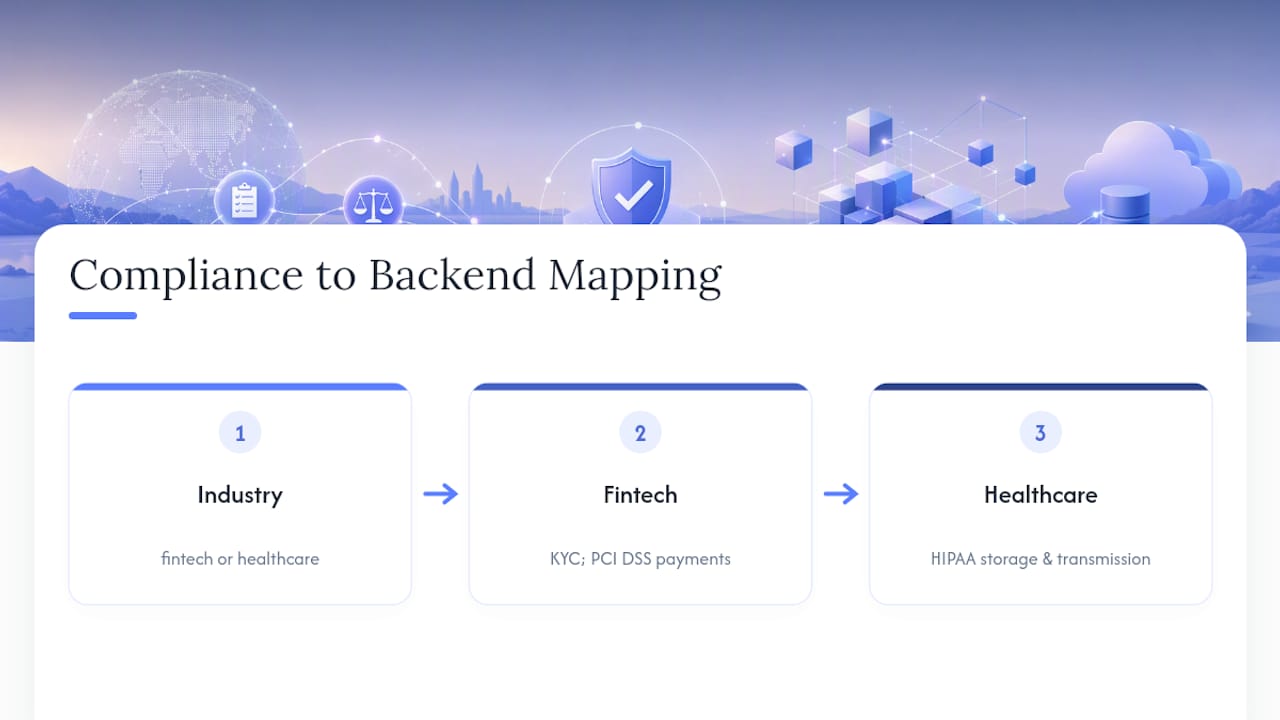
Industry-specific compliance adds further cost. A fintech app needs KYC (know-your-customer) verification and often PCI DSS compliance for payment handling. A healthcare app needs HIPAA-compliant data storage and transmission. These aren’t optional add-ons, they’re structural requirements that shape your backend architecture from day one, which is exactly why they belong in your initial scoping conversation rather than a post-launch patch.
Budget compliance work as a fixed line item in your planning phase, not a contingency. For a mid-scope app handling standard personal data, $5,000 to $10,000 in legal and compliance work is a reasonable planning figure. Regulated industries should expect that figure to run several times higher.
How Much Do App Updates and Version Upgrades Cost?
An app is never really “done.” Operating systems update, user expectations shift, and competitors ship new features, all of which create ongoing update costs separate from the maintenance figures covered earlier.
Minor updates, bug fixes, small UI tweaks, compatibility patches for a new OS version, typically cost a few hundred to a few thousand dollars each and happen several times a year. These are usually covered within a standard maintenance retainer.
Major version upgrades are a different budget category entirely. A mid-scope app that cost $80,000 to build might see a major version 2.0 upgrade cost $20,000 to $40,000, roughly comparable to building a meaningful new module from scratch.
Platform-forced upgrades are the category most teams forget to plan for. When Apple or Google deprecates an API or changes a core requirement, non-compliant apps get pulled from the store or lose functionality. These updates aren’t optional and rarely align with your own product roadmap, which is why a maintenance retainer with some built-in flexibility for platform-driven work is worth more than a maintenance contract priced purely on your own feature requests.
Version numbering also matters for budgeting conversations: keep a running log of what triggered each release (bug fix, platform requirement, or new feature) so you can see over time whether your update costs are being driven by your product decisions or by forces outside your control.
An Editorial Take: What Procurement Teams Get Wrong About App Costs
Most cost guides treat this as a math problem: multiply hours by rate, add a margin, done. That framing misses the actual failure mode. Projects don’t blow their budgets because someone mispriced an hourly rate. They blow up because nobody made a hard decision about scope before the contract was signed, and every unresolved question got answered mid-build, at three times the cost it would have taken to answer it up front.
The decision that matters most isn’t native versus cross-platform or freelancer versus agency. It’s whether to build in-house or bring in a partner, and most companies get this backwards. If software isn’t your core competency and this isn’t your fourth or fifth app, hiring a partner almost always beats hiring a team, because the fixed overhead of full-time salaries rarely pencils out against a project with a defined start and end.
My advice for anyone about to write an RFP: skip the RFP first. Book a scoped discovery call or commission a small proof of concept before you ask anyone for a fixed quote. A fixed quote based on a vague feature list is a guess wearing a suit. A quote based on a validated scope, one where the backend approach, integration list, and acceptance criteria are already agreed on, is an actual commitment you can hold someone to.
If you’re briefing a vendor, bring three things to the first conversation: your must-have feature list separated clearly from your nice-to-haves, any compliance requirements you already know about, and a realistic sense of your own timeline pressure. Vendors who ask you hard questions about all three before quoting a number are the ones worth trusting with your budget.
— Matija
How Nullbit Turns This Budget Guide Into a Working App
Most of the guesswork in this article disappears the moment you have a partner who scopes before quoting instead of after. Nullbit builds mobile apps the way this guide recommends approaching them: a tightly scoped MVP first, cross-platform and BaaS by default unless your feature list genuinely needs native, and a contract structure that matches how much certainty you actually have about the final product.
That means choosing between an Agile, time-and-materials engagement when your scope is still evolving, or a fixed-price turnkey project once requirements are locked, both structured around milestone payments so you’re never funding vague progress. If you’re validating an idea before committing to a full build, a proof-of-concept engagement starting from €5,000 gets you a working prototype without the risk of a six-figure commitment on an unproven concept. For teams ready to scope a full build, Nullbit’s mobile app development service covers everything from architecture decisions through app store launch.
The next step is simple: book a scoped discovery conversation before you write an RFP. You’ll walk away with a realistic budget range for your specific feature list, not a generic estimate pulled from an industry average.
Where These Cost Figures Come From
The dollar ranges in this guide are drawn from published industry benchmarks rather than a single vendor’s price list, which matters when you’re trying to sanity-check any quote you receive. Project Cost Estimator’s mobile app cost breakdown offers granular ranges by feature set and is useful for cross-checking a mid-scope estimate. Zoho’s app development cost guide provides the phase-by-phase percentage splits used throughout this article. Business of Apps’ developer research aggregates survey data across many agencies and freelancers, useful for triangulating the high and low ends of the spectrum. Couchbase’s cost breakdown offers a technical-buyer perspective that corroborates the same wide range. For estimating your own hosting and infrastructure costs specifically, the Azure pricing calculator lets you model compute and storage costs against your expected user volume before you commit to a monthly hosting budget.
Sources
- Mobile App Cost in 2026: $10K-$150K (iOS + Android)
- How much does app development cost in 2026?
- App Development Cost (2025) - Business of Apps
- App Development Costs (A Breakdown) - Couchbase
- Statista — app market outlook
FAQ
What Is the Average Cost of a Mobile App?
Most mobile apps cost between $25,000 and $150,000, with the exact figure depending heavily on backend complexity and platform choice. Simple single-purpose apps can come in under $50,000, while complex or marketplace apps regularly exceed $250,000.
How Much Does a Simple Mobile App Cost?
A simple app with basic screens and minimal backend logic typically costs $10,000 to $50,000, with freelancers pricing toward the lower end and agencies toward the upper end. Monthly ongoing costs for a simple app usually stay under $500.
How Much Does It Cost to Program a Mobile App?
Programming (development labor alone, excluding design and QA) typically represents 50% to 70% of a project’s total budget, since front-end and back-end work each commonly claim 25% to 35% of the budget. On a $60,000 mid-scope project, that places development costs within those percentage ranges.
Can I Make a Mobile App for Free?
You can build a very basic app for free using no-code tools with significant feature and scalability limits, but any app with custom backend logic, integrations, or a polished user experience requires paid development. Nullbit’s smaller solutions start at €15,000 for a properly scoped custom build.
Does Nullbit Offer Fixed-Price Mobile App Development?
Yes. Nullbit offers both fixed-price turnkey projects and flexible time-and-materials engagements, with fixed-price projects ranging from €5,000 to €60,000 depending on scope, alongside ongoing Agile engagements priced monthly for evolving projects.


